Pumpkin Pet Costume: AI Pet Portrait Guide
A pet portrait works because the animal does not have to pose. Keep the breed, markings and eyes, add a soft pumpkin costume, and let the studio light do the rest.
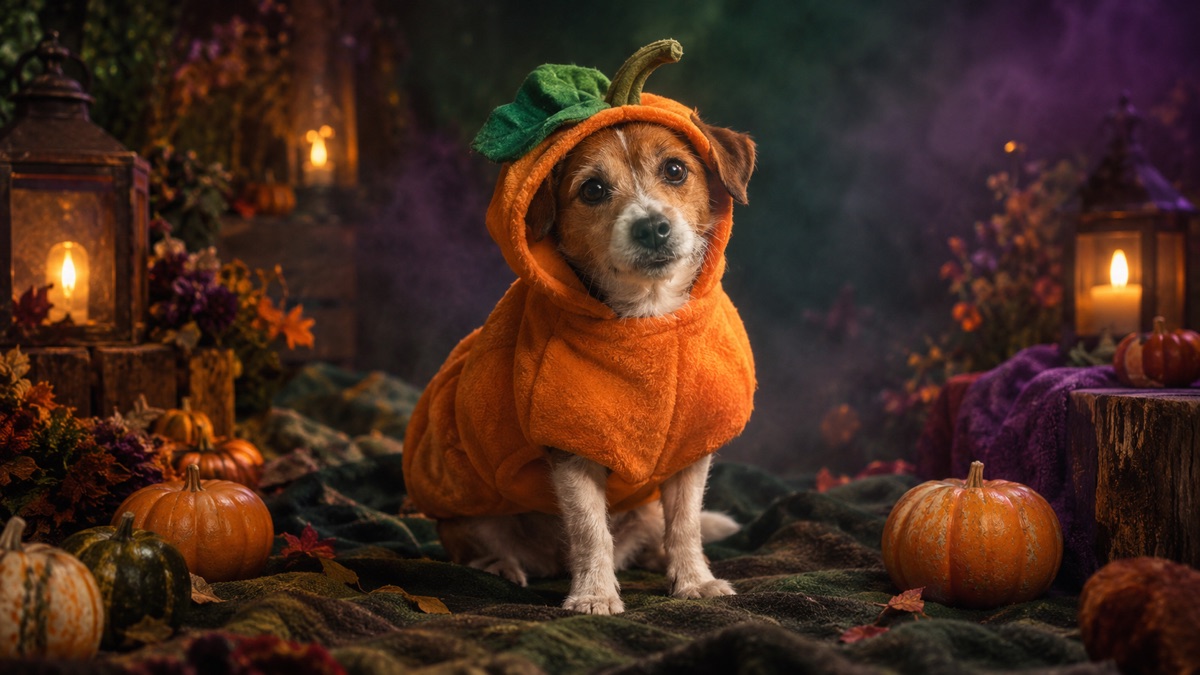
Quick answer
- Preserve the breed, fur color, markings, eye color and anatomy before describing the costume.
- A soft pumpkin costume with a green leaf is enough. Do not cover the eyes or change the species.
- Warm studio light and miniature pumpkins make the portrait feel intentional.
- Animate a blink, a head tilt and drifting dust, not a walk cycle.
Why pet costumes are a strong Halloween page
Pet costume searches are emotional and practical at the same time. The visitor already has a photo, already has a pet, and wants a shareable result. That is a much shorter path to a useful tool than a full human costume shoot.
The visual bar is also lower in one important way: nobody expects a pet to look like a different species. If the fur, markings and eyes survive, the portrait reads as the same animal. The costume is allowed to be a little absurd.
Popular searches in 2026 include pumpkin, baked potato, glow-in-the-dark dinosaur, stick of butter and a headless horseman. Pumpkin is the safest first look because the silhouette is simple and the color works with almost any fur.
What to preserve in a pet edit
- Breed and body shape. A dachshund must stay long; a corgi must keep the ears and low stance.
- Fur color and markings. Name the patches, socks, mask or blaze. These are the identity cues.
- Eye color and expression. If the eyes change, the animal looks like a different pet.
- Natural anatomy. Four legs, natural paws, no extra tails.
- Costume fit. The costume should sit on the body, not replace it. Do not cover the eyes.
Put these in the first two sentences. A later style sentence cannot recover an identity that was already lost.
The exact pumpkin pet prompt
This prompt preserves the animal first, then adds the costume and the studio. It is deliberately gentle: no straps, no hats, no props that could hide the face.
Use the uploaded pet photo as the primary reference. Preserve the animal’s original breed, fur color, distinctive markings, eye color, facial appearance and natural anatomy. Dress the pet in a soft pumpkin-inspired Halloween costume with a small green leaf accessory. Keep the costume fitted naturally without covering the animal’s eyes or changing its species. Place the pet in a cozy autumn photography studio with warm lighting and miniature pumpkins. Create a photorealistic professional pet portrait with realistic fur texture and natural shadows. Avoid extra animals, unnatural paws, duplicated limbs, text and watermarks.
Image-to-video prompt
The pet blinks and tilts its head slightly, the costume leaf moves, and warm dust motes drift through the studio light. The camera stays steady. No new animals.
Common pet portrait failures
| Symptom | Fix |
|---|---|
| Breed changed | Name the breed and two physical traits in the first sentence |
| Extra legs or paws | Ask for a seated pose with all paws visible and no extra limbs |
| Costume covers the eyes | Say "the costume must not cover the eyes" and choose a smaller costume |
| Fur looks like plastic | Ask for realistic fur texture, individual strands and natural shadows |
| Background is cluttered | Use a simple autumn studio with one prop and warm light |
The five-second pet clip
Pets are hard to animate because the model wants to invent a walk. Keep the body still. Ask for a blink, a small head tilt, a leaf moving on the costume and dust motes in the studio light. The camera stays locked.
If the model adds a second animal, stop and regenerate the still. A video model will animate the extra animal too, and the clip becomes unusable.
Generate your pumpkin pet
Upload a clear pet photo, choose Pumpkin Pet and generate. A seated or standing photo with the face visible works best. The studio does not keep the image after the request.
Halloween AI studio
Frequently asked questions
Can I turn my pet into a pumpkin?
Yes. Upload a clear pet photo and use the Pumpkin Pet preset. The prompt preserves the breed, fur, markings and anatomy while adding a soft costume.
Will the AI change my pet’s breed?
It can if the preservation clause is weak. Name the breed and two distinctive traits in the first sentence, and check the ears, muzzle and body shape.
Can I use a photo of a pet that is not mine?
Only with the owner’s permission. The site does not keep the image, but the model provider processes it for the request.
Can I generate a glow-in-the-dark dinosaur instead?
Yes. Replace the pumpkin costume sentence with a glow-in-the-dark dinosaur costume, keep the preservation clause, and use a dark studio background.
Why does the costume cover the eyes?
The model placed a hat or hood too low. Add "must not cover the eyes" and choose a body-only costume.
Can I animate the portrait?
Yes. Use a blink, a head tilt and moving dust. Keep the body still and the camera locked.